
Soon the days of manual sign-in sheets at BCBP events will be a distant memory.
The introduction of the Brother’s Keeper online database (BK3) marks a new era of efficiency and convenience for members. With every member assigned a unique QR code, attendance tracking becomes a seamless process. This article is a guide on how the digital attendance system will be implemented.
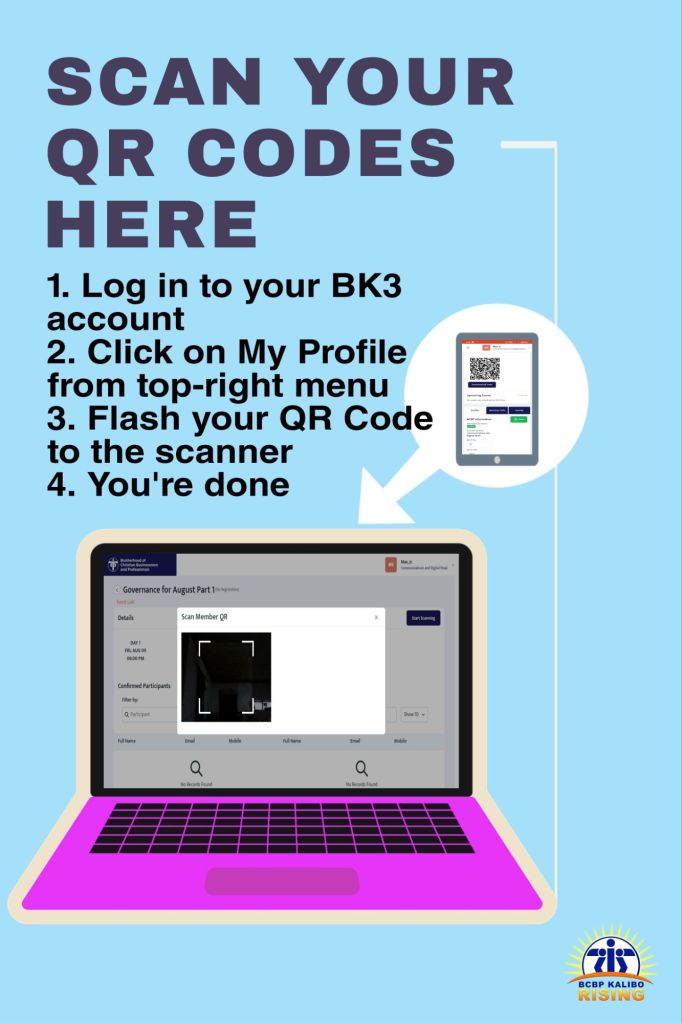
Attendance collection is quick and painless when done digitally. If you haven’t already, register your Brother’s Keeper account here.
- In order to find your unique QR code, you must log in to your account and find it in your Profile information. You may log in to your BK3 account every time you need to access your code but alternatively you can save your QR Code to your mobile device for easier access.
- Flash your QR Code to the receiving device which may be a dedicated reader, a PC or a mobile device. Note that you may have to align your code to fit inside a bounding box in order for the recording device to properly read your QR Code.
- Once your code is recorded then you’re done.
 BCBP Kalibo Rising
You must be logged in to post a comment.